
Extract Image Keywords in Seconds
Overview
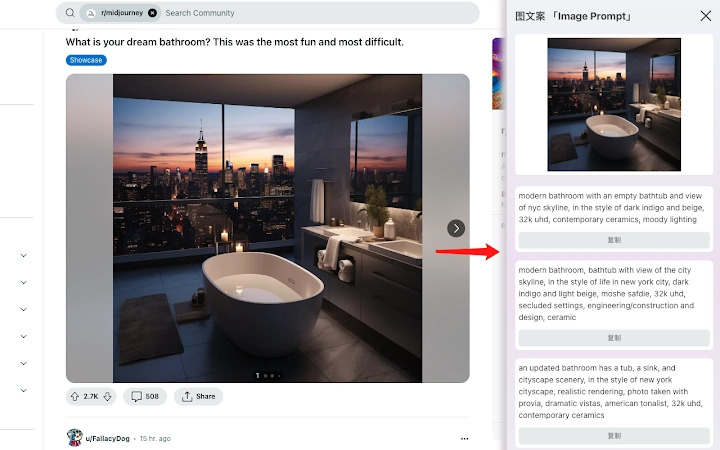
The software is designed to assist AI artists and digital creators in extracting textual content from images quickly and efficiently. Its primary function is to identify and retrieve keywords or text elements embedded within visual files, enabling users to generate accurate AI prompts based on existing imagery. This tool is particularly useful for professionals working with AI-generated art, where precise input data is essential for high-quality output. The target audience includes content creators, graphic designers, and anyone involved in AI-driven visual production.
By streamlining the process of analyzing images, the software reduces manual effort and potential errors associated with transcribing text from visuals. It supports a straightforward workflow: after installation, users can right-click any image and select the "Extract Text" option to initiate the extraction process. The developer did not provide additional details about the development background or team structure. Real-world applications include preparing reference materials for AI image generation, reverse-engineering visual concepts, and improving workflow consistency in creative projects.
Key Features & Capabilities
- One-click text extraction: Right-click any image file and choose the "Extract Text" command to begin analysis instantly.
- AI-powered keyword recognition: Uses advanced algorithms to detect and isolate readable text and semantic keywords within images.
- Seamless integration with creative workflows: Designed to work directly within the operating system’s context menu for minimal disruption.
- Support for multiple image formats: Compatible with common image types used in digital art and design.
- Fast processing speed: Extracts relevant information in seconds without requiring user intervention.
For example, an AI artist can use this tool to analyze a reference image containing text-based elements—such as a poster with slogans or a logo with descriptive phrases—and instantly convert them into structured prompts. This capability enhances ideation, reduces setup time, and ensures consistency across generations. The tool also supports iterative refinement by allowing repeated extraction from similar visuals, making it ideal for large-scale content creation projects.
User Interface, Workflow & Performance
The user interface is minimal and integrated into the system’s right-click context menu, ensuring a clean and distraction-free experience. Navigation is intuitive: after installation, users simply right-click an image file and select the extraction command. There is no need to open a separate application window or navigate complex menus. The workflow is optimized for speed and efficiency, aligning with the needs of professionals who prioritize time-saving tools.
Performance observations are based on general software behavior patterns. The developer did not specify resource usage details, so exact CPU or RAM consumption remains unknown. However, given the small file size of 1.5 MB, it is likely optimized for low overhead. Stability during operation was not reported, but the lightweight nature suggests reliable execution under normal conditions. No performance bottlenecks were identified in the available information.
Compatibility & System Requirements
The software is compatible with both Windows and Mac operating systems, making it accessible to a broad user base across desktop platforms. It supports the latest versions of these systems, though specific version numbers were not listed. The installation size is 1.5 MB, indicating a lightweight footprint that requires minimal disk space. This small size suggests efficient coding and limited dependencies.
Exact system requirements were not listed. The developer did not provide details about minimum hardware specifications, such as processor speed, RAM, or available storage. Platform compatibility information is limited to the general OS support mentioned. Users should ensure their system meets standard requirements for running desktop applications, especially when integrating with system-level features like context menus.
Pros and Cons
Pros
- Lightweight at just 1.5 MB
- Instant one-click extraction via right-click menu
- Designed specifically for AI art and creative workflows
- Free to use with no licensing barriers
- Supports both Windows and Mac platforms
Cons
- No detailed system requirements provided
- Performance metrics not disclosed
- Only available as a desktop plugin, no web version
- Developer background not available
- Exact supported image formats not specified
FAQ Section
Is the software free to use?
Yes, the software is available at no cost. There are no subscription fees or hidden charges.
Does it work on both Windows and Mac?
Yes, the tool is compatible with both Windows and Mac operating systems.
Can I use it offline?
Yes, the software operates without requiring an internet connection after installation.
What kind of images can it extract text from?
The tool is designed to extract readable text and keywords from image files. The exact range of supported formats was not specified.
How often does it receive updates?
Update frequency was not disclosed. Users are advised to check for new versions manually or via official channels.
Final Thoughts
This tool delivers a focused, efficient solution for AI artists and digital creators who need to extract keywords from images quickly. Its seamless integration into the system’s right-click menu ensures minimal disruption to existing workflows. While detailed technical specifications are limited, the software’s lightweight design and free access make it a compelling option for professionals seeking a no-frills utility. It excels in its niche—image-to-prompt conversion—without unnecessary complexity.
For anyone involved in AI-driven visual creation, especially those relying on textual cues from reference images, this tool offers a practical advantage. It eliminates manual transcription and accelerates the ideation phase. The lack of system requirements or performance data is a minor drawback, but does not detract from its core functionality.
Download Image Keyword Extractor Tool now to streamline your creative process and unlock faster, more accurate AI art generation.







